Sunday, March 2, 2014

Find Stolen or Lost Android Mobile Easily

I am Sure this is Awesome post for Android lovers and will enjoy. Yes! This is something big. Now you can find your lost, Misplaced and stolen Android device easily without any third party apps. In our previous post we explained how to Trace your lost android mobile with some apps but Here in this post you don't need any app to find your device where it is. This is can done by simply using Android device manager. Android Manger is one which it will get installed directly on your device when you use Google play for the first time. So you don't need to download any third party apps. Nobody knows that they will lost their device if they know that they will keep them safe for sure so maximum of people don't install any tracking app to trace their lost device. For this people android device manger can work like miracle.

Find Stolen or Lost Android Mobile Easily:

Some Advantages:
  • You can find your misplaced mobile or tab.
  • You can erase data in your device from any where
  • Helps you to trace your lost device.
  • Lock your device from anywhere.
How to use Android device manger to find lost device:
  • First thing you need to do is using your device navigate to security in settings and then to device administrator.
  • Now tap on it and activate if it is off.
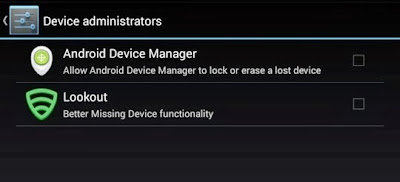
Note: I suggest you to do this step right now  because device administrator must be activate to take advantage of Android device manger.
  • Now go to Google Play Store.
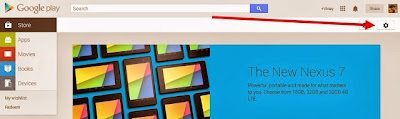
  • You can find Gear icon at right side top. Just like in below screen capture.
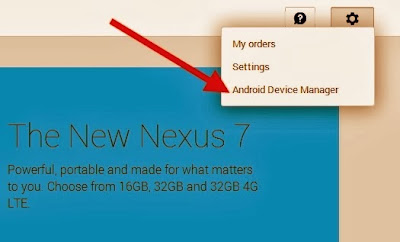
  • Now Click on Gear icon then you can find three options My Order,Settings and then last Android device manager.Just click on Android device manager.
  • As soon as you click on android device manager it will find the device with which it is associated.
  • As soon as Android device manger find your device it will show you on Google maps. It will also indicate how far is your distance from you.
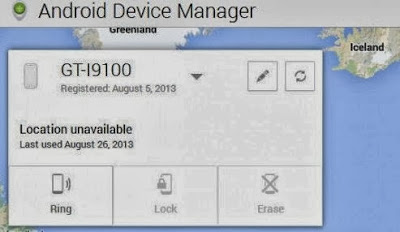
You can find three Options:
  • Ring: If you click on Ring then your device mobile or tab will ring though it is in silent mode.This feature fails when device is switched off.
  • Lock: If you click on Lock then it will lock your device and you can get new password to access your device.
  • Erase: If you click on Erase then total memory in that device will be erased automatically.Make sure once you click erase then all the data will be deleted including android device manager so it wont work again.That's it Guys I am sure this will help you a lot ! So don't forget to share it.If you have any problem just comment below we will help you out.

How to Run Multiple WhatsApp Account On Android

Today i' am going to tell you how to Run multiple whatsapp account on a same android phone at same time. There are occasions or times when one needs to have multiple accounts on the same phone such as when you have a dual SIM phone or when you tend to be only one who own a smart phone in your circle of friends or in the family as well. There are many methos to run mutiple whatsapp accounts on your device. But all these require Root access. As some people having concern regarding Root so, i suggest them to read our previous post about Rooting.

But today the method i' am going to tell you does not require any root access and it is most easiest method ever. So, Here we begins...

In this method you have to simply install a application.
OGWhatsApp is a new App which will soon be found in different websites or you can also use this app for your smartphone (ANDROID)  mobile devices. OGWhatsApp will provide you to run 2 numbers continuously at one time. Earlier in whatsApp you can only use one number at one time and you can only use one account of whatsapp at one time. But, now OGWhatsApp is a new App where you can use two numbers of whatsApp at one time.You can also say OGWhatsApp is a updated version of WhatsApp.This is developed by the person named As Osama Ghareeb. This OGWhatsApp gives you many features and these are:


Features Of OGWhatsApp :

  • You Can change the Icon of the WhatsApp Messenger.
  • You can use 2 numbers on one device.
  • You can restore your backup and also save your backup.

How To Install OGWhatsApp :
 
    
  • First of all Download the OGWhatsApp from here.
  • Create a backup of your WhatApp messenger.
  • Clear WhatsApp data from the Settings/Uninstall your WhatsApp messenger.
  • Then Rename your WhatsApp folder in your SD card to OGWhatsApp.
  • In OGWhatsApp verify your old number and whereas in official version verify you new number.

Advantages of Rooting your Smartphone


Hello Friends, in this post i'm talking about advantages of android rooting, there are some advantages of android rooting. These days android rooting is becoming a trend which every android user wants to follow but always has a sense of fear. Well rooting is important for the android users because they love having the authority to customize their phone to the fullest and many other benefits. Rooting an Android Phone also gives a user faster performance with its device and also enables him to install custom ROMs, and access to hundreds of new and free apps.


Firstly you should know what is Android rooting?
Android rooting is the process of allowing users of Smartphone’s, tablets, and other devices running the Android mobile operating system to get the full control and authority within Android’s subsystem. When you root an Android phone it enables you to act as the administrator of the phone. Android rooting provides you the facility to completely remove and replace your device’s operating system, usually with a more recent release of its current operating system for example from Android ICS to Android JellyBean Though the rooting is very popular these days but many Android users are completely unaware how to root their Smartphone’s and tablets. Before, Rooting an Android device was cumbersome task and moreover rooting also removed the manufacturer’s warranty from the device. As a result, many users were frightened away from rooting their Android. But today Android users can root their devices in minutes ….Thanks to new Android rooting software programs; any user can root the device easily and quickly.

What Rooting gives its users? (ADVANTAGES OF ROOTING)


Advantages of Rooting your Smartphone:


  • Plenty of Apps.
  • Speed /Battery life Boosts.
  • A Free Wi-Fi Hotspot.
  • Better Backup.
  • Latest Operating System (OS)Updates.
  • Infinite Features.
  • Increases Performance.
  • Reversible.
  • Access Blocked Features.
  • Install Custom ROM’s.
  • Full control over your system.
  • Saturday, March 1, 2014

    Increase Ram Of your Android Mobile Using SD Card


    Hello friends, today in this post i'm introducing a new technique and some tips to increase RAM of your android device. This difference in hardware can greatly affect your phone, you can not use bigger size apps, and can not play heavy games or you can not run multiple application at the same time or the hanging problem and many more. But everyone can not afford the high range phones. And majority of this problem is due to the processor and the ram size. So in this post, i'm talking about how to increase ram of your android phone and you also play heavy games and use multiple applications.


    How to Increase Ram In Android Using Sd Card ?

    Note: Increasing ram does not mean that you are internally adding some hardware to your Android phone. Its not possible for a normal man to alter the hardware of Android device so as to increase its Ram. Its been risky and one need to be professional to change the hardware. And also manufacturer has some guidelines for this.  But don’t worry there is some simple way to increase ram in Android, you just need to follow the instruction. And you can easily increase your ram in maximum 10-15 minutes. Using this method or trick you can increase your ram upto 4 GB.

    Requirements:

    • 1. SD card as you want but class 4 or higher SD Card will give excellent speed to your Phone.
    • 2. Rooted smartphone.
    •     Or Rooted Tablet (If you want to increase RAM and Internal Memory of it.)
    • 3. SD card reader
    • 4. Windows PC
    • 5. An internet connection for downloading a few softwares or you can get it from somewhere else also.
    Partition Your SD Card:
    First step you have to do is to partition your SD Card and for doing this you have to,

    1. Download Mini tool Partition from Here.

    2. Install the application on your PC and connect your SD card to your PC with Card Reader.

    3. Open Mini Tool Partition in your PC and when the wizards open click on your SD Card and select Delete option. (Note: This will format your SD Card completely mean that it will erase your data permanently, so previous to doing this backup your data at any place in PC or other Storage device.)

    4. When the Formatting of your SD Card is completed then, you have whole of space of your SD Card as unallocated then Right click SD Card and select make option.

    5. A popup box will open giving you options for making partition; select the partition as primary and file system as FAT if SD Card is less than 4GB or FAT32 if your SD Card is more than 4GB.

    6. Leave about 512 MB or more space (your choice) for making the next partition.

    7. Then select done and do right click on unallocated space of your SD Card and again click make option. Select Primary partition but change the file system to Ext2, Ext3 or Ext4.

    Note: (Ext2 is not compulsory as most ROMs work fine with it).

    How To Make Ram Of SD Card Android:

    1. Click Apply Changes and then process goes on for the few minutes and then partition is completed.

    2. Install Link2sd from Google Play or download and install the .apk format file from here to your phone.

    3. On the first launch of the app, it will question for root permissions and then, it will question you the file system of the .ext partition that you had before made, choose the option as you had choose in the partitioning steps.

    4. Sort the apps according to size and start linking them.

    Friday, February 21, 2014

    Why we use Adobe Flex?

     Flex is an Asynchronize and high productive technology, building web and desktop based rich internet application using different frameworks and operating systems by leveraging the Adobe Flash player and Adobe AIR. While Application build using only Adobe Flex builder.  Compare to other development platforms like java, Microsoft technologies, they such complex but Adobe Flex applications are much easier to integrate and more efficient to maintain. Flex provides a modern, standards-based language and programming model that supports common design patterns. There are lots of frameworks available in market such as cairngorm, Mate, PureMVC, Parsley, RobotLegs and Swiz.

    Flex can create number of different application types such as E-commerce with vast shopping carts. It also can be used to create widgets and Plugins for popular social sites such as facebook, twitter and myspace.
    • Adobe Flex is easily integrate with other technologies using Remote service, Web service and http service but remote service is more powerful and provide fast response as compare to other services. We can also directly connect to SQLLite database from Adobe Flex or AIR.
    Client Technology

    (Adobe Flex / AIR)
    Bridge Technology
    (WebOrb for Microsoft.Net, PHP, Ruby on Rails and Java)
    (AMF (Action Message Format) for PHP and Ruby on Rails)

    (FluorineFx for Microsoft.Net)

    (BlazeDs and LCDS for Java)
    Server Technologies

    Advantage of using Abode Flex / AIR

    • High Productive and building Rich Internet Applications
    • High Performance and cross platform runtime
    • Integrated support for text, graphics, animation, and audio/video
    • Enterprise data integration
    • Support for disconnected computing ( Online and offline synchronization )
    • Provide high Security and reliability

    Microsoft ASP.NET MVC Overview


    The Model-View-Controller (MVC) architectural pattern separates an application into three main components: the model, the view, and the controller. The ASP.NET MVC framework provides an alternative to the ASP.NET Web Forms pattern for creating Web applications. The ASP.NET MVC framework is a lightweight, highly testable presentation framework that (as with Web Forms-based applications) is integrated with existing ASP.NET features, such as master pages and membership-based authentication. The MVC framework is defined in the System.Web.Mvc assembly.
               MVC design pattern

    mvc_DesignPatternMVC is a standard design pattern that many developers are familiar with. Some types of Web applications will benefit from the MVC framework. Others will continue to use the traditional ASP.NET application pattern that is based on Web Forms and postbacks. Other types of Web applications will combine the two approaches; neither approach excludes the other.
    The MVC framework includes the following components:
    • Models. Model objects are the parts of the application that implement the logic for the application's data domain. Often, model objects retrieve and store model state in a database. For example, a Product object might retrieve information from a database, operate on it, and then write updated information back to a Products table in a SQL Server database.
      In small applications, the model is often a conceptual separation instead of a physical one. For example, if the application only reads a dataset and sends it to the view, the application does not have a physical model layer and associated classes. In that case, the dataset takes on the role of a model object.
    • Views. Views are the components that display the application's user interface (UI). Typically, this UI is created from the model data. An example would be an edit view of a Products table that displays text boxes, drop-down lists, and check boxes based on the current state of a Product object.
    • Controllers. Controllers are the components that handle user interaction, work with the model, and ultimately select a view to render that displays UI. In an MVC application, the view only displays information; the controller handles and responds to user input and interaction. For example, the controller handles query-string values, and passes these values to the model, which in turn might use these values to query the database.
    The MVC pattern helps you create applications that separate the different aspects of the application (input logic, business logic, and UI logic), while providing a loose coupling between these elements. The pattern specifies where each kind of logic should be located in the application. The UI logic belongs in the view. Input logic belongs in the controller. Business logic belongs in the model. This separation helps you manage complexity when you build an application, because it enables you to focus on one aspect of the implementation at a time. For example, you can focus on the view without depending on the business logic.
    The loose coupling between the three main components of an MVC application also promotes parallel development. For example, one developer can work on the view, a second developer can work on the controller logic, and a third developer can focus on the business logic in the model.


    In addition to managing complexity, the MVC pattern makes it easier to test applications than it is to test a Web Forms-based ASP.NET Web application. For example, in a Web Forms-based ASP.NET Web application, a single class is used both to display output and to respond to user input. Writing automated tests for Web Forms-based ASP.NET applications can be complex, because to test an individual page, you must instantiate the page class, all its child controls, and additional dependent classes in the application. Because so many classes are instantiated to run the page, it can be hard to write tests that focus exclusively on individual parts of the application. Tests for Web Forms-based ASP.NET applications can therefore be more difficult to implement than tests in an MVC application. Moreover, tests in a Web Forms-based ASP.NET application require a Web server. The MVC framework decouples the components and makes heavy use of interfaces, which makes it possible to test individual components in isolation from the rest of the framework.

    You must consider carefully whether to implement a Web application by using either the ASP.NET MVC framework or the ASP.NET Web Forms model. The MVC framework does not replace the Web Forms model; you can use either framework for Web applications. (If you have existing Web Forms-based applications, these continue to work exactly as they always have.)
    Before you decide to use the MVC framework or the Web Forms model for a specific Web site, weigh the advantages of each approach.

    Advantages of an MVC-Based Web Application

    The ASP.NET MVC framework offers the following advantages:
    • It makes it easier to manage complexity by dividing an application into the model, the view, and the controller.
    • It does not use view state or server-based forms. This makes the MVC framework ideal for developers who want full control over the behavior of an application.
    • It uses a Front Controller pattern that processes Web application requests through a single controller. This enables you to design an application that supports a rich routing infrastructure. For more information, see Front Controller.
    • It provides better support for test-driven development (TDD).
    • It works well for Web applications that are supported by large teams of developers and for Web designers who need a high degree of control over the application behavior.

    Advantages of a Web Forms-Based Web Application

    The Web Forms-based framework offers the following advantages:
    • It supports an event model that preserves state over HTTP, which benefits line-of-business Web application development. The Web Forms-based application provides dozens of events that are supported in hundreds of server controls.
    • It uses a Page Controller pattern that adds functionality to individual pages. For more information, see Page Controller.
    • It uses view state on server-based forms, which can make managing state information easier.
    • It works well for small teams of Web developers and designers who want to take advantage of the large number of components available for rapid application development.
    • In general, it is less complex for application development, because the components (the Page class, controls, and so on) are tightly integrated and usually require less code than the MVC model.
    The ASP.NET MVC framework provides the following features:
    • Separation of application tasks (input logic, business logic, and UI logic), testability, and test-driven development (TDD). All core contracts in the MVC framework are interface-based and can be tested by using mock objects, which are simulated objects that imitate the behavior of actual objects in the application. You can unit-test the application without having to run the controllers in an ASP.NET process, which makes unit testing fast and flexible. You can use any unit-testing framework that is compatible with the .NET Framework.
    • An extensible and pluggable framework. The components of the ASP.NET MVC framework are designed so that they can be easily replaced or customized. You can plug in your own view engine, URL routing policy, action-method parameter serialization, and other components. The ASP.NET MVC framework also supports the use of Dependency Injection (DI) and Inversion of Control (IOC) container models. DI enables you to inject objects into a class, instead of relying on the class to create the object itself. IOC specifies that if an object requires another object, the first objects should get the second object from an outside source such as a configuration file. This makes testing easier.
    • Extensive support for ASP.NET routing, which is a powerful URL-mapping component that lets you build applications that have comprehensible and searchable URLs. URLs do not have to include file-name extensions, and are designed to support URL naming patterns that work well for search engine optimization (SEO) and representational state transfer (REST) addressing.
    • Support for using the markup in existing ASP.NET page (.aspx files), user control (.ascx files), and master page (.master files) markup files as view templates. You can use existing ASP.NET features with the ASP.NET MVC framework, such as nested master pages, in-line expressions (<%= %>), declarative server controls, templates, data-binding, localization, and so on.
    • Support for existing ASP.NET features. ASP.NET MVC lets you use features such as forms authentication and Windows authentication, URL authorization, membership and roles, output and data caching, session and profile state management, health monitoring, the configuration system, and the provider architecture.

    Cross-Platform Mobile Development

    Smartphones and tablets are becoming integral part of every one’s life, this vast demand leads to many OEM and many platform available in market, this obviously means a wide spectrum of devices and many choices the user has and they are available in different range and one can select based on their need either on different platform or extending the open source one and customize it. But what does the proliferation of different devices mean for product companies? It means increased cost of development and maintenance of the solution. In order to cut these costs down to some extent there are few such solutions. Below are few cross platform kit that Verve has capability on:
    1.  Rhomobile provides a complete set of products for managing an enterprise’s mobile apps and data. Rhomobile uses the power and productivity of web technology and the cloud to allow enterprises to more easily develop design and distribute the application.
    Platforms: iOS, Android, Blackberry, Windows Mobile
    License: Free
    2.  Appcelerator is a free and open source application development platform. Appcelerator Titanium lets you create native mobile, tablet and desktop application experiences using existing web skills like Javascript, HTML, CSS, Python, Ruby, and PHP. It comes with an in built language-OS bridge and a runtime shell that compiles and packages your applications for cross platform distribution.
    Platforms: iOS, Android based mobiles and tablets and windows/linux/mac desktop based apps
    License: Free
    3.  PhoneGap is a HTML5 app platform that allows you to author native applications with web technologies and get access to api’s and appstore. Allows to develop applications for iPhone, iTouch, iPAD, Android, Blackberry, Symbian and Palm becoming one of the few products that supports almost all major platforms. The company offers a cross-platform simulator (an Adobe AIR app), as well as online training sessions to help you access native APIs and build functioning mobile apps on the PhoneGap platform.
    Platforms: iPhone, Blackberry, Android, Symbian and Palm
    License: Free (Open Source)